 Applying Keys During Product Installation
License keys applied to PDF-XChange products during installation are placed in HKLM and subsequently available for all users. Note that installers must be run by an account with the necessary privileges. If an account that does not have these privileges is used to initiate an installer then the Windows UAC will be triggered and prompt for an account with the necessary rights. If these cannot be given then the installation will be canceled.
If you want to apply a license to only a specific group of users then it is necessary to apply the license after the installation.
GUI-Based Installations
The installer runs as a privileged user, which means that the license will be placed in HKLM for all users, regardless of which user initiated the installation. When an installation is performed via the GUI, KEYDATA (the alphanumeric string that is the license key, as detailed below) can be pasted from the Windows clipboard into the installer:
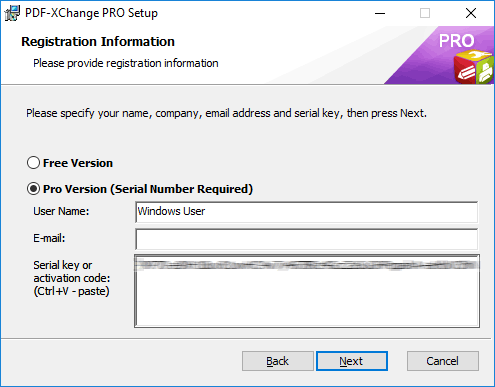
Figure 1. PDF-XChange PRO Setup Dialog Box (GUI Installation)
The license key will be placed in HKLM (and encrypted) when installation is complete:
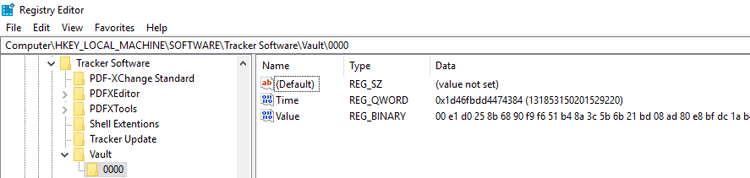
Figure 2. Windows Registry Editor, Encrypted License Key in the HKLM Registry Hive for All Users
Note that a KEYFILE (XCVault file) cannot be used for a GUI-based installation.
Unattended Installations
Applying a key during an unattended installation requires the use of the .msi installation switches KEYFILE or KEYDATA. Unattended installations put the license keys into HKLM (as they run as an elevated account that does not have access to HKCU) and make the license keys available to all users on the system. Further information on the .msi installation switch options is available in the online manuals for each product:
•The PDF-XChange Editor .msi installation switches are detailed here.
•The PDF-Tools .msi installation switches are detailed here.
•The PDF-XChange Printer Standard .msi installation switches are detailed here.
•The PDF-XChange PRO .msi installation switches are detailed here.
Please note that we do not recommended using the .exe installers for unattended installations due to the issues detailed here.
Methods for Passing License Keys to an Installer
There are two methods available for passing a license key to an installer - KEYFILE and KEYDATA. These methods both have advantages and disadvantages in comparison to each other, but the end result is the same regardless of which method is used to pass the key.
KEYFILE
Pros:
•Uses simple syntax.
•Avoids CR and LF issues in license key string.
Cons:
•Sensitive to file system permissions issues.
•Potential for challenges when used with user-mapped drives.
KEYDATA
Pros:
•Does not depend on file system permissions.
•Independent of network structure.
•When used with a transform can be re-applied for multiple installations without modifying the transform.
Cons:
•The length of the string can result in an unwieldy command that is difficult to read.
•Potential for CR and LF issues when copying/pasting the string.
Examples
Install the PDF-XChange PRO bundle using KEYDATA:
msiexec /i ProV10.x64.msi /qb KEYDATA="PXP70-...XivAvAUl4Q+XivqqLSozuRTqTCxnRv0sNR1i2UTPSA5AvAUl4Q+UTPSA5AvAUl4QXivqqLSozuRTqTCxnRv0sNR1i2UTPSA5AvAUl4Q="
Install PDF-XChange Editor using KEYFILE:
msiexec /i EditorV10.x64.msi /qb KEYFILE="\\UNC\path\to\xcvaultfile.xcvault"
See here for passing the key via a transform (MST file).