 Generating Bookmarks a from Table of Contents
Click the Bookmarks tab, then click Generate Bookmarks from Table of Contents to create bookmarks from an existing table of contents:
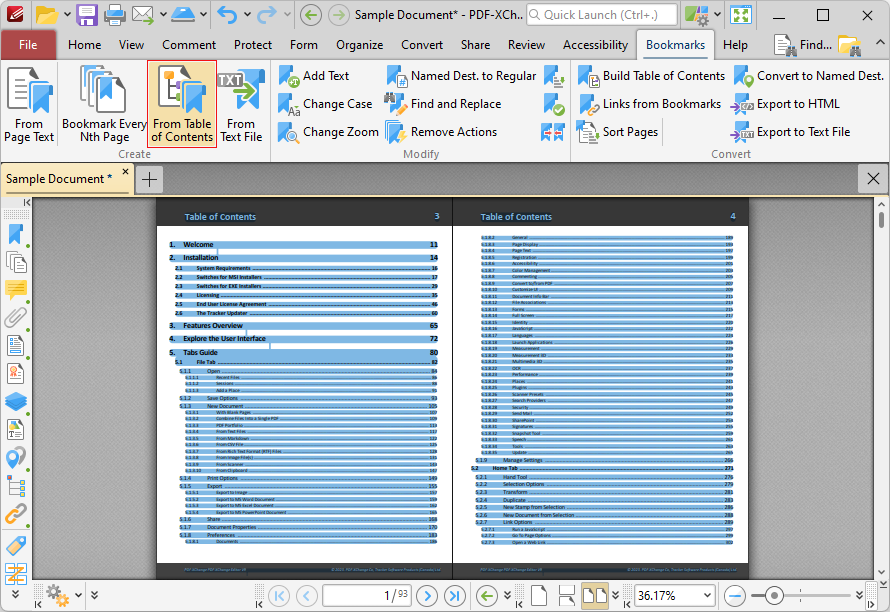
Figure 1. Bookmarks Tab, Generate Bookmarks from Table of Contents Highllighted
Please note that the table of contents must first be selected using the Select Text Tool for this feature to be available. When it is executed, the following dialog box will open:
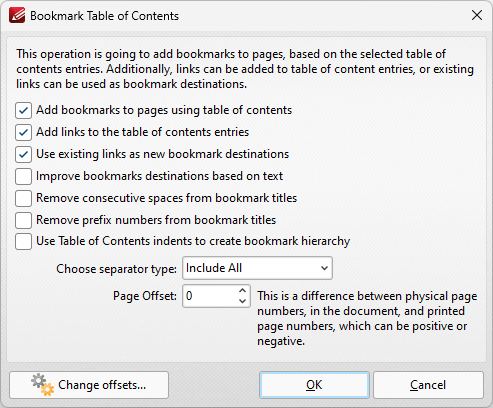
Figure 2. Bookmark Table of Contents Dialog Box
•Select check boxes to enable/disable parameters.
•Use the Choose separator type dropdown menu to select a separator for bookmarks.
•Use the Page Offset box to set a page offset as desired.
•Click Change Offsets to adjust top and/or bottom offsets.
Click OK to generate bookmarks.