 Adding Barcodes to Documents
Barcodes provide a useful method for the storage of information that barcode readers and mobile devices such as smartphones and tablets can access. Click Add QRCode to add barcodes to documents:
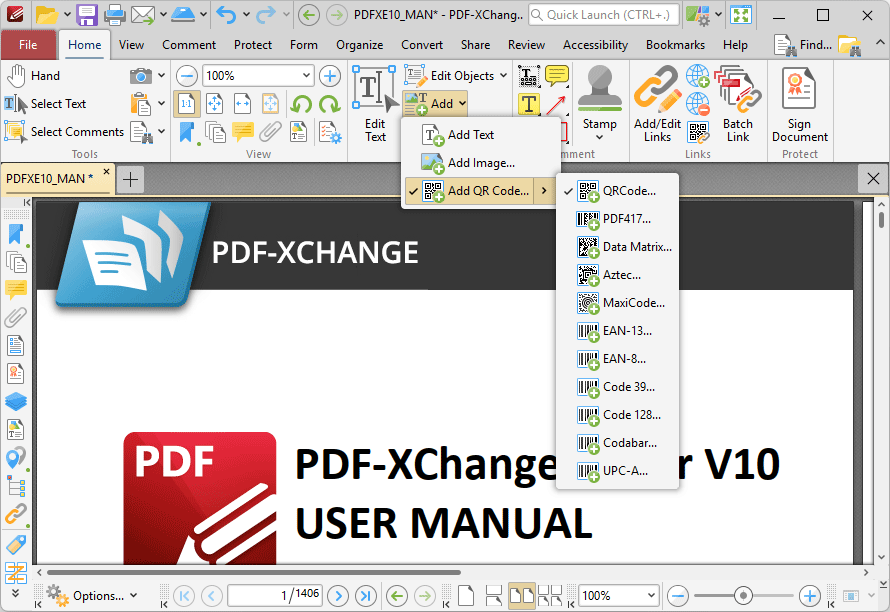
Figure 1. Add Submenu, Add Barcode
The Select Barcode Placement Tool dialog box will open when. Click Drag Barcode Rectangle to add a new barcode. The pointer will become a crosshairs icon. Click and drag to determine the size and location of the barcode. The Add Barcode dialog box will open:
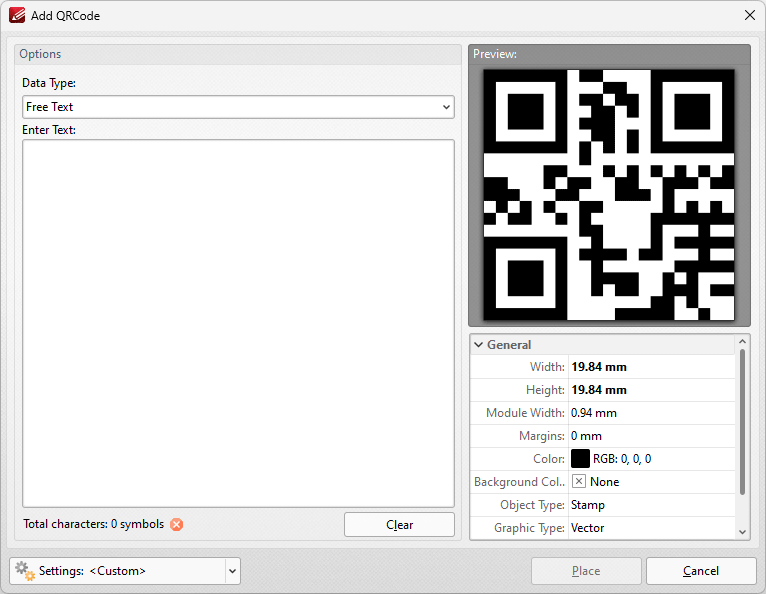
Figure 2. Add Barcode Dialog Box
•Use the Data type menu to set the format of the data contained in the barcode:
•Contact (vCard) is a file format standard that is used to store electronic business cards.
•URL is used to store internet addresses.
•Free Text is used to store text-based content.
•Email is used to store information in email format.
•Barcodes are created automatically when data is entered in the text fields, and can be viewed in the Image preview pane.
•Select either As Stamp annotation or As part of page's content to determine how barcodes are added to documents. Please note that stamp annotations and page content have different editing options.
•Select either As Vector or As Image as desired. If the Image option is selected then use the DPI number box to determine the barcode resolution.
•Select the Add Margin box to add a margin to barcodes.
•Use the Fill color and Barcode color palettes to determine the colors used for barcodes.
Click Place to add the barcode to the document.