 Adding Text to Bookmark Titles
Click the Bookmarks tab, then click Add Text to Bookmark Titles to add text to bookmark titles:
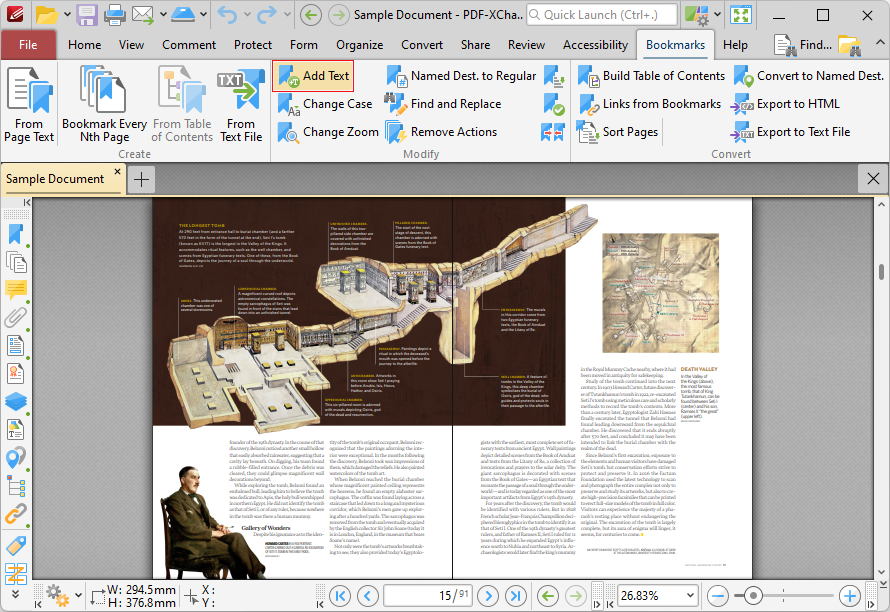
Figure 1. Bookmarks Tab, Add Text to Bookmark Titles Highlighted
The Add Text To Bookmark Title dialog box will open:
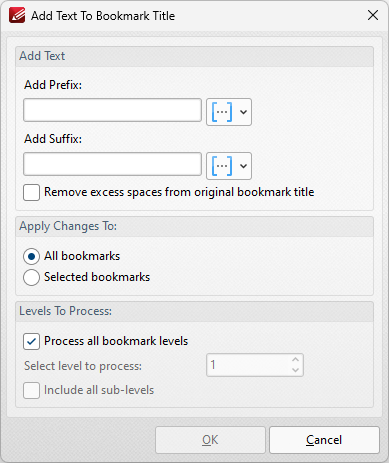
Figure 2. Add Text to Bookmark Title Dialog Box
•Use the Add Prefix/Suffix text boxes to add prefixes/suffixes to bookmark titles. Click the icon to add macros.
•Select the Remove excess spaces from original Bookmark Title box to remove additional spaces from bookmark titles.
•Select either All Bookmarks or Selected Bookmarks in the Use Bookmarks dropdown menu to determine which bookmarks are updated. Select bookmarks in the Bookmarks pane in order to use the Selected Bookmarks option.
•Select the Process all bookmark levels box to process all bookmark levels. Alternatively, clear the box and select a customized level. The number entered in the number box determines the level of bookmarks that are processed. Select the Include all sub-levels box to include all bookmark levels.
Click OK to add text to bookmark titles.