 Flattening Comments to Base Content
Click Flatten Comments to flatten comments and annotations to the base content layer of documents:
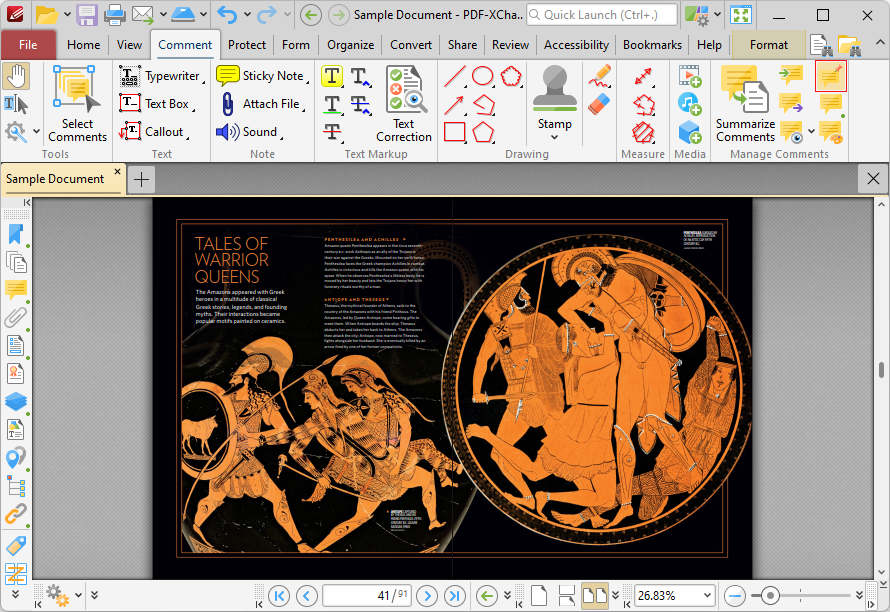
Figure 1. Comment Tab, Flatten Comments
The Flatten Annotations dialog box will open:
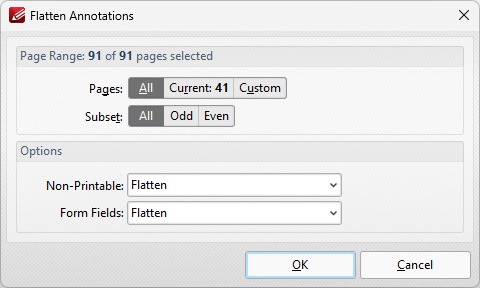
Figure 1. Flatten Annotations Dialog Box
•Use the Page Range options to determine the page range in which comments are flattened:
•Select All to flatten comments/annotations on all pages.
•Select Current Page to flatten comments/annotations on only the current page.
•Use the Pages box to specify a custom page range in which to flatten comments/annotations. Further information on the specification of page ranges is available here.
•Use the Subset option to specify a subset of custom page ranges. Select All Pages, Odd Pages Only or Even Pages Only as desired.
•Use the Non-Printable and Form Fields options to determine the outcome of the flattening process for non-printable annotations and form fields. (The Properties options for comments/annotations can be used to determine whether or not they are printable):
•Select Flatten to flatten content
•Select Left as Is to retain the existing state of content.
•Select Remove to remove the content from the document.
Click OK to flatten comments and annotations to base content.