 Changing the Zoom Factor of Bookmarks
Click the Bookmarks tab, then click Change Bookmarks Zoom Factor to edit the zoom factor of bookmarks:
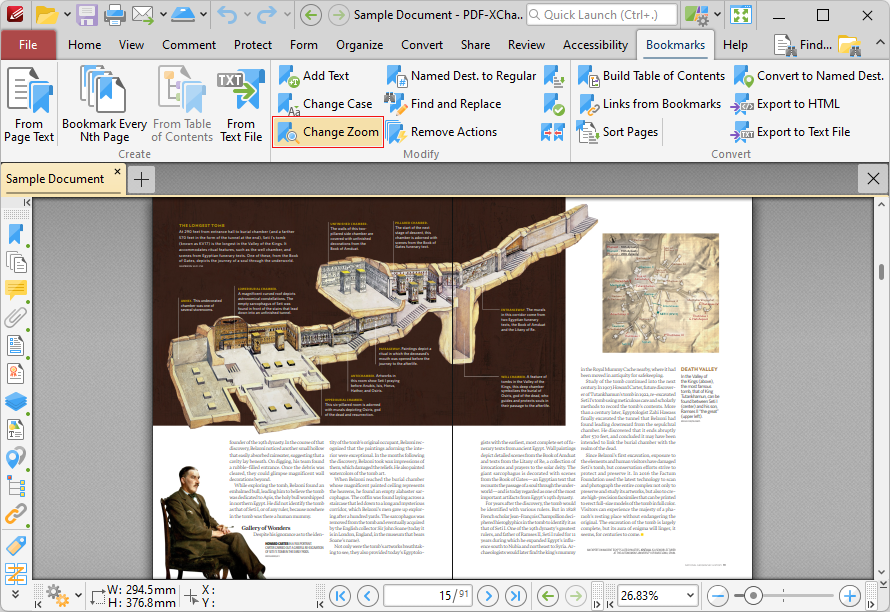
Figure 1. Bookmarks Tab, Change Bookmarks Zoom Factor Highlighted
The Set Bookmark Zoom Type dialog box will open:
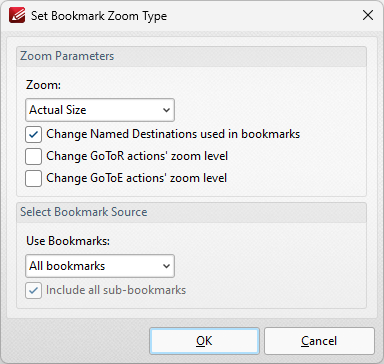
Figure 2. Set Bookmark Zoom Type Dialog Box
•Select an option in the Zoom dropdown menu to determine the new zoom level for bookmarks.
•Select the Change Named Destinations used in Bookmarks box to include named destinations in the operation.
•Select the Change GoToR actions' zoom level box to include links to other documents in the operation.
•Select the Change GoToE actions' zoom level box to include links to embedded documents in the operation.
Click OK to update the bookmark zoom settings.