 SharePoint
The SharePoint preferences determine settings for using SharePoint in conjunction with PDF-Tools:
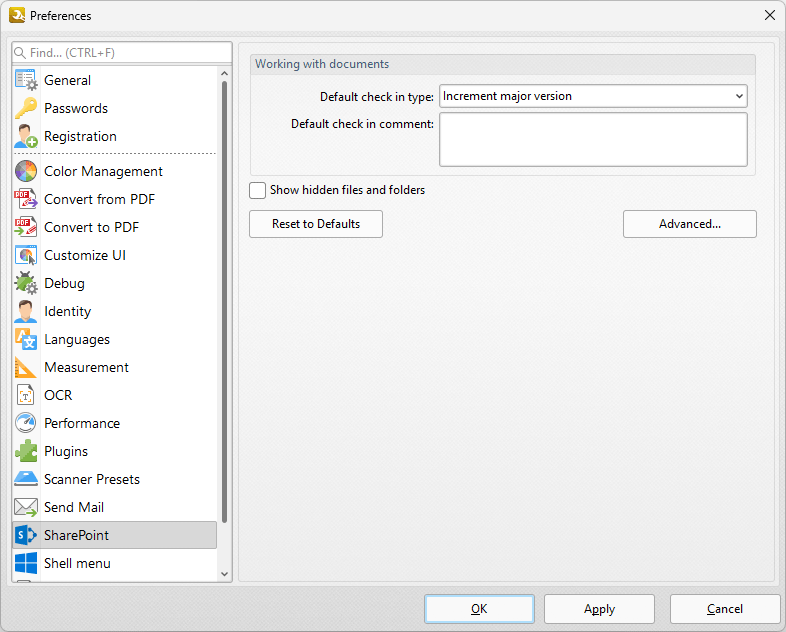
Figure 1. Preferences Dialog Box, SharePoint Tab
•Use the Default check in type dropdown menu to determine the default check in type used.
•Use the Default check in comment box to determine the default comment used during check in.
•Select the Show hidden files and folders box as desired.
•Click the Reset to Defaults button to reset all values to their default value.
•Click Advanced to view/edit advanced SharePoint settings, as detailed below.
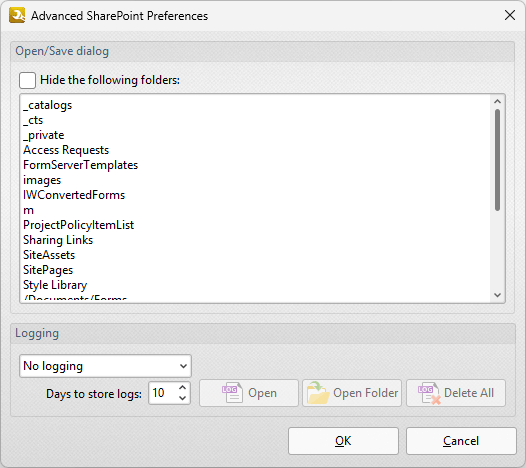
Figure 2. Advanced SharePoint Preferences Dialog Box
•Select the check box to hide folders, then specify the folders to be hidden in the window below.
•Use the Logging dropdown menu to determine the type of logging recorded, and the number box to determine the period for which log files are saved.
•Click Open/Open Folder/Delete All to open/delete log files.
Click OK to save settings.