 Find Duplicate Pages
The Find Duplicate Pages action finds sets of duplicate pages and makes them available for other tool actions. It contains the following customizable parameters:
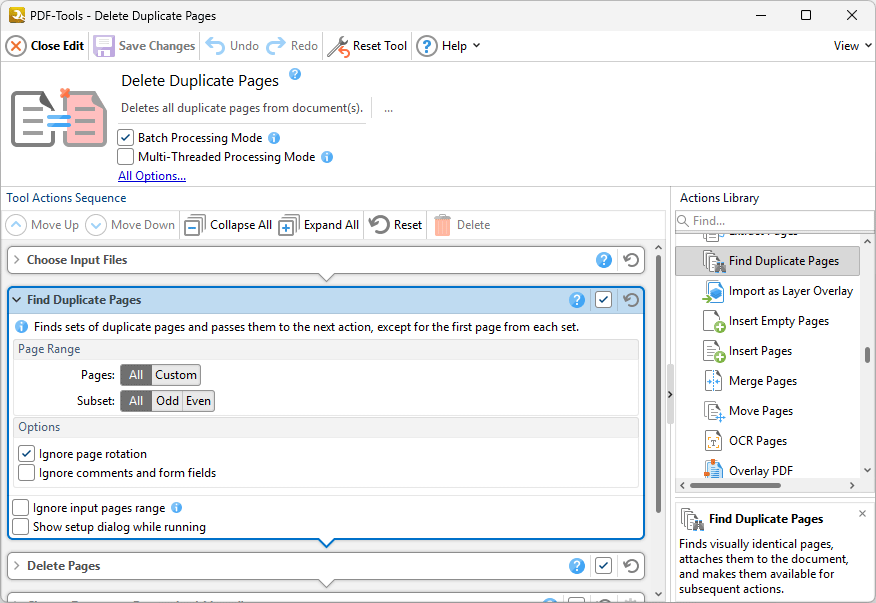
Figure 1. Find Duplicate Pages Action Parameters
•Use the page range settings to determine the page range in which to search for duplicated pages. Further information on the specification of page ranges is available here.
•Select the Ignore page rotation and Ignore comments and form field boxes to ignore the respective elements of documents when searching for duplicated pages.
•Select the Ignore Input Pages Range box to ignore any page range settings specified in the Choose Input Files extended dialog box. If this option is not selected then the respective page ranges will be intersected and and only shared values will be used.
•Select the Show setup dialog while running box to launch the Find Duplicate Pages dialog box and customize settings each time this action is used. Clear this box to disable the Find Duplicate Pages dialog box from opening each time the action is used, which is useful when the same settings are used consistently.
Click  Save Changes to save changes.