 Delete Duplicate Pages
The Delete Duplicate Pages tool deletes duplicated pages from documents:
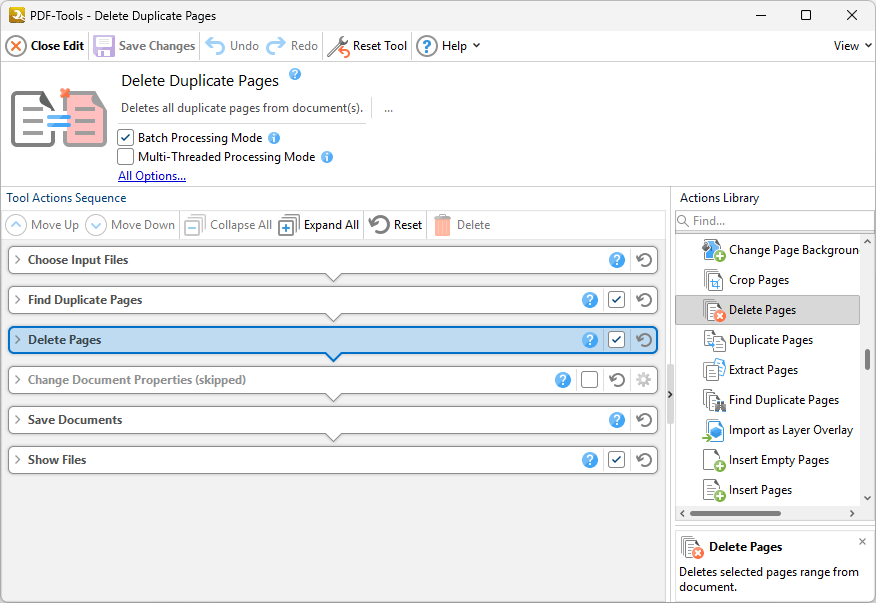
Figure 1. Delete Duplicate Pages Tool Actions Sequence
The Delete Duplicate Pages tool uses five tool actions:
1.  Choose Input Files - the tool prompts for source documents.
2.  Find Duplicate Pages - duplicated pages are identified, and all pages except for the first page of each set of duplicates are passed to the next tool action.
3.  Delete Pages - the duplicated pages are deleted.
4.  Change Document Properties (skipped by default) - the document properties are changed.
5.  Save Documents - the updated documents are saved.
6.  Show Files - the new documents are displayed in their destination folder.
Click actions to view customizable parameters. Additionally, please note that the Clone Tool feature can be used to clone this tool and then add/remove actions from the Tool Actions Sequence.
Information about the Batch Processing Mode and Multi-Threaded Processing check boxes is available here.